
What System 1 Build does.
Six capability families that keep a commercial construction project on one working record — from the project workspace through drawings, field records, RFIs, contracts and reporting.
Project Workspace
Open the project and its working context is already resolved — so nobody starts the day reconstructing where the job stands.
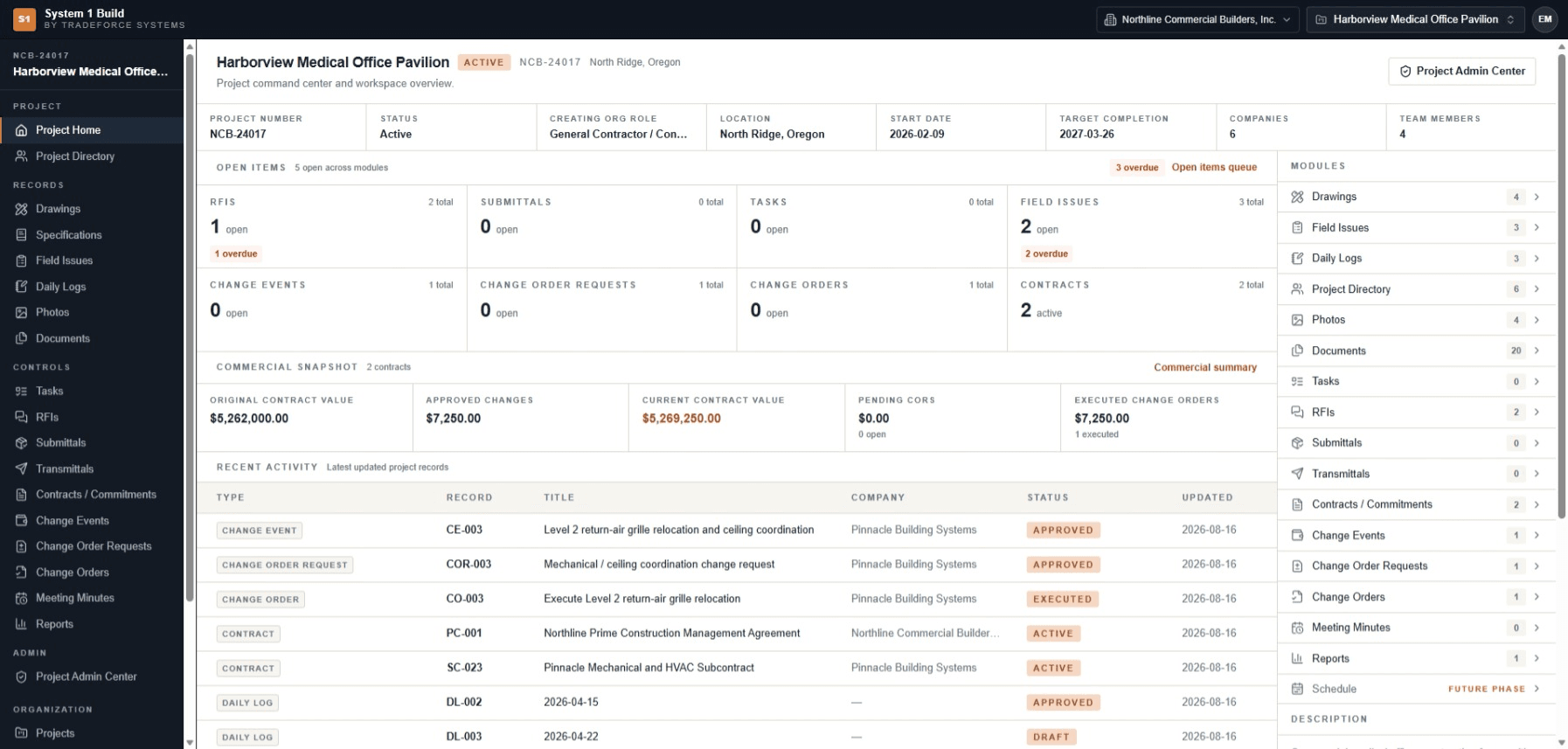
The job, and the state it is in.
Open items resolve across every record type at once, and recent activity shows what actually moved — so the state of the job is readable from the project itself rather than assembled from it.
- Project context
- Number, status, location, start and target completion held on the project record.
- Open items
- Counts across RFIs, submittals, tasks, field issues, change events, change order requests, change orders and contracts.
- Recent activity
- The latest updated records across the project, with the responsible company and current status.
- Project directory
- The companies and team members attached to the project.
- Module index
- Every record type reachable from project context, with how much sits in each.
Drawings & Visual Records
Hold the drawing set — and everything that happens to it. The register, the revisions, the sheet itself, the markup on it and the comparison that shows what changed.
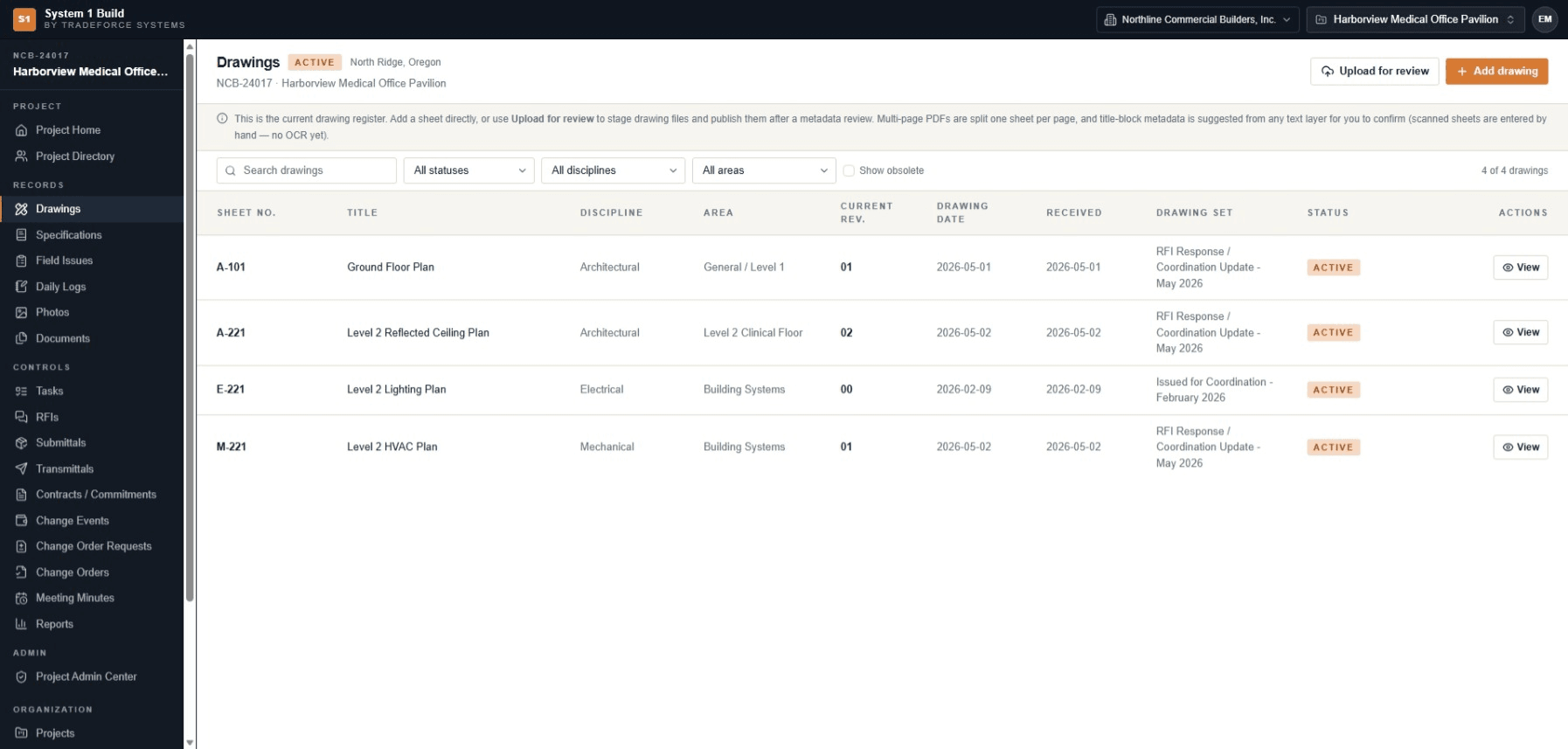
A register that answers “which sheet is current?”
Every sheet carries its number, title, discipline, area, current revision, drawing date, received date, drawing set and status. Obsolete sheets stay out of the way until you ask for them.
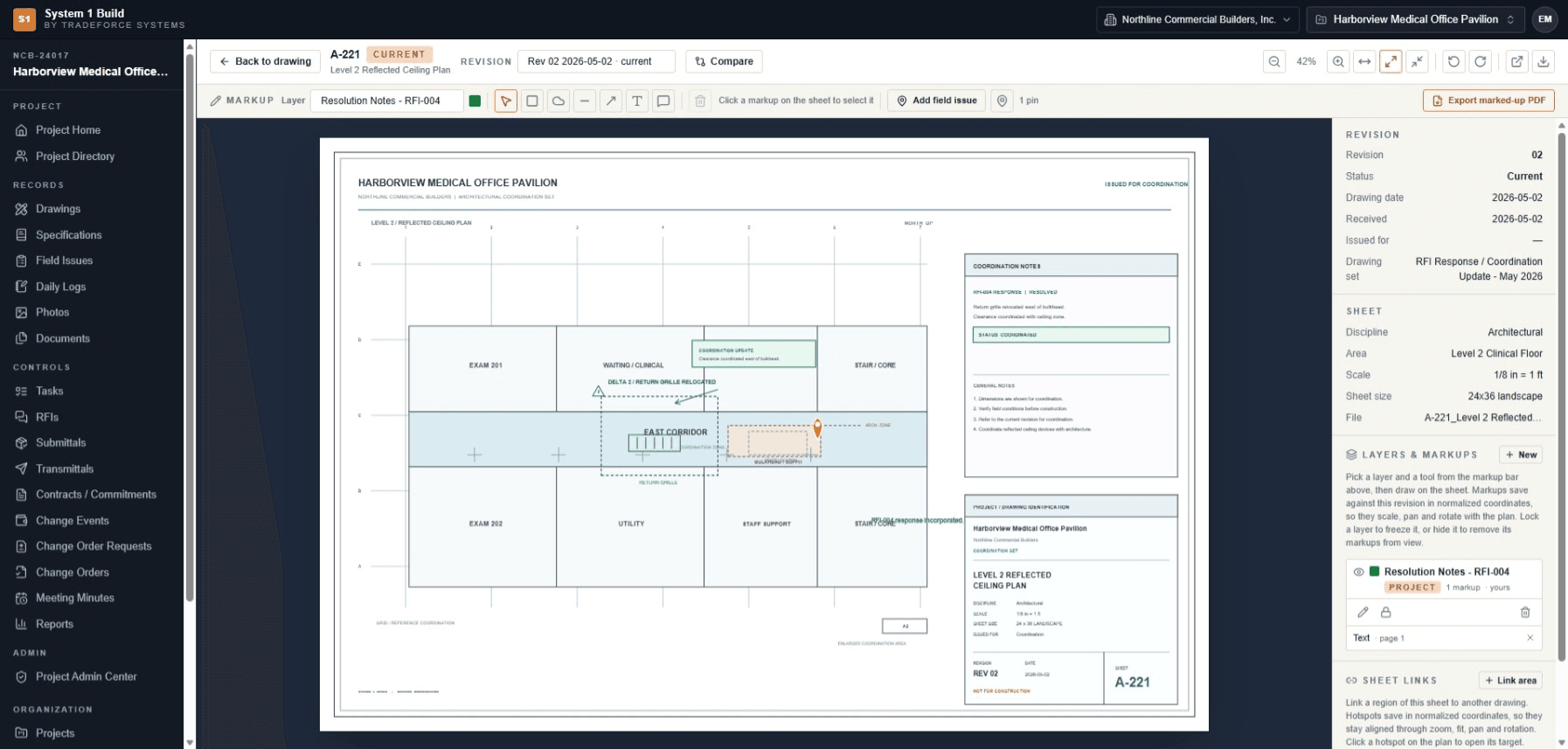
Open the sheet, mark it up, keep the markup with the revision.
Markups save against the revision in normalized coordinates, so they hold their position through zoom, pan and rotation. Layers can be locked or hidden, and the marked-up sheet can be exported as a PDF.
A field issue can be raised directly from the sheet, and sheet links let a region on one drawing point at another.
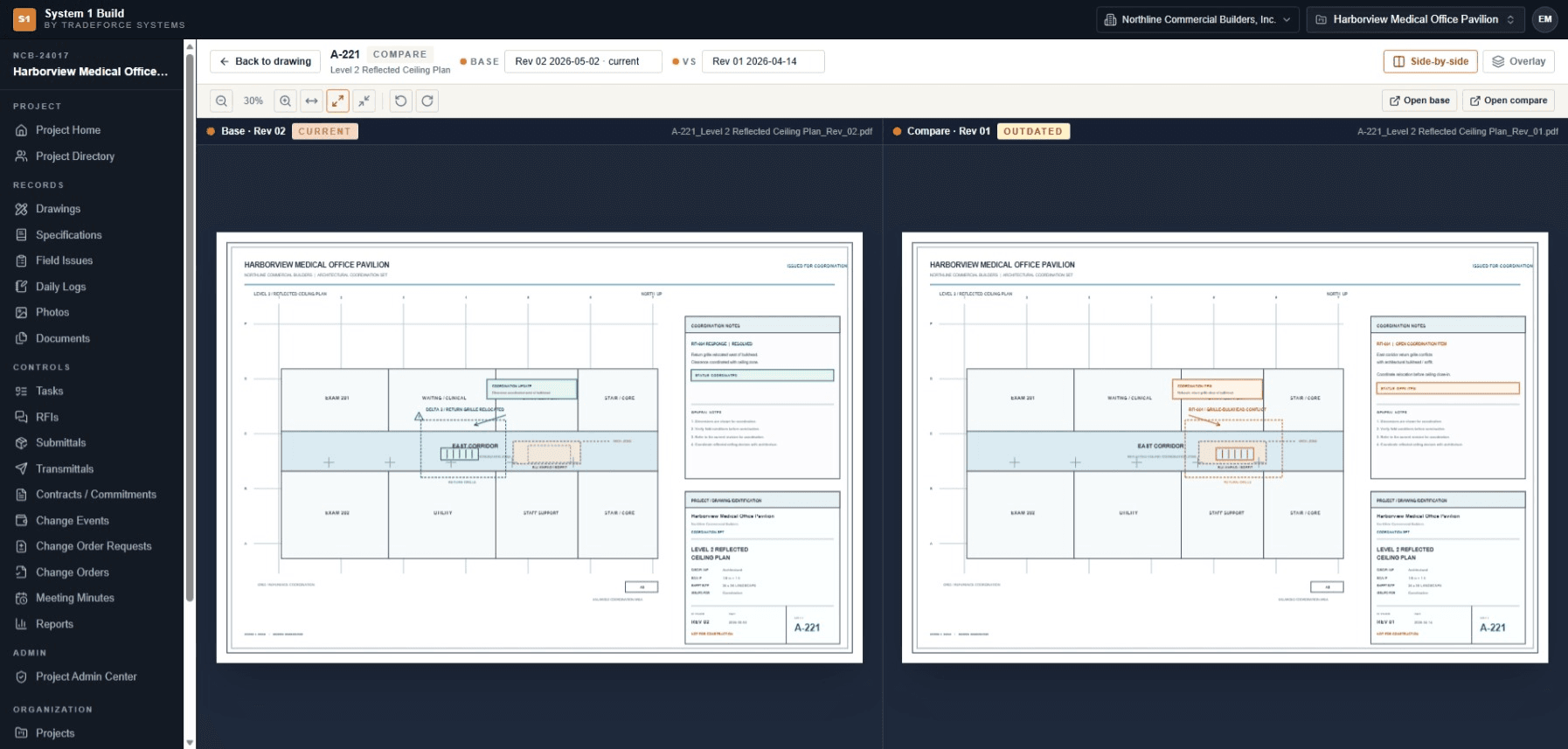
See what changed — not just that a revision exists.
Put the current sheet beside the revision it replaced, side-by-side or overlaid. Rev 02 reads CURRENT; Rev 01 reads OUTDATED.
- Getting sheets in
- Add a sheet directly, or stage drawing files and publish them after a metadata review.
- Multi-page PDFs
- Split one sheet per page on import.
- Title-block metadata
- Suggested from a sheet's text layer for you to confirm. Scanned sheets are entered by hand — text is not extracted from images.
- Photo records
- Project photo records preserve visual context alongside the drawing set.
Field Records & Issues
A field observation becomes a record with a type, an owner and a date — not a message somebody has to remember.
Issues that carry their own context.
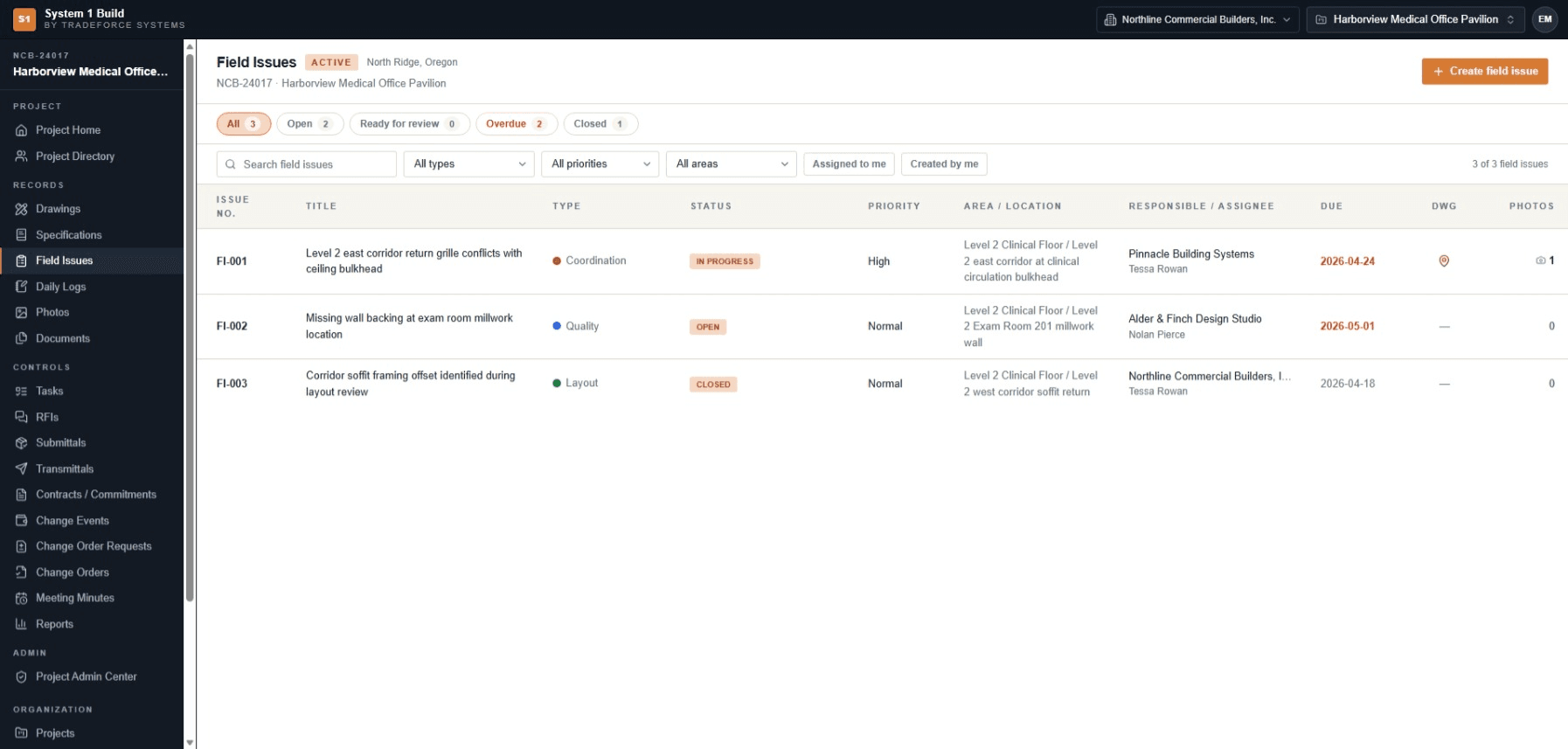
Each field issue holds an issue number, title, type, status, priority, area and location, the responsible company and assignee, a due date, the drawing it relates to and any photos attached to it. Open, overdue, ready-for-review and closed states are filters, not folders.
- Field Issues with responsible company, assignee and due date
- Coordination, quality and layout issue types
- Issues raised directly from the drawing they were found on
- Daily Logs kept against the project
- Project photo records
RFIs, Documents & Specifications
The questions, submissions and documentation that decide how the job gets built belong with the job — not in an inbox.
One place to ask, answer and file.
RFIs, submittals, transmittals, documents, specifications and meeting minutes are project records with their own state. Open counts and overdue flags surface on the project workspace, so an unanswered question is visible before it becomes a delay.
- RFIs
- Questions and responses held against the project, with open and overdue visibility.
- Submittals
- Submittal records kept with the job.
- Transmittals
- A record of what was issued, and to whom.
- Documents
- Project documentation in one place rather than several shared drives.
- Specifications
- Specification records held beside the drawing set.
- Meeting Minutes
- Decisions recorded against the project.
Contracts & Changes
Keep the project's commercial position visible to the people running the work, at the level the project actually needs.
Changes that stay attached to the record that caused them.
Change events, change order requests and change orders progress alongside the contracts they affect, and appear in project activity with their company and status as they move.
System 1 Build provides project contract and change visibility. It is not presented as complete accounting or financial management, and it does not replace an accounting system.
Project Reports
Review what the project already holds, without exporting it somewhere else first.
Project reporting is there to make the maintained record legible — what is open, what has moved and where the project stands — rather than to become a separate reporting system of its own.
- Scope
- Reporting over the records the team maintains in the project.
- Source
- The same project record the workspace and modules read from.
System 1 Build is not presented as a business-intelligence or advanced analytics platform.
What this release does not do.
Being clear about the edges is part of the product. These are current boundaries, stated plainly.
Scheduling
Shown in the product as a future phase. It is not offered as a current capability.
Drawing text recognition
Scanned sheets are entered by hand. Text is not extracted from scanned images.
Accounting
Project contract and change visibility, not complete accounting or financial management.
Analytics
Project reporting over maintained records, not a business-intelligence platform.
Start with the project controls your team wants to make clearer.
A focused product conversation can begin with your current drawings, records and handoffs rather than a generic feature tour.